
This guide documents Core Console 3.45, reviewed 2026-09-12, with 100 product capabilities and the registered implementation inventories below. Reporting is described in the connected configuration. The PC NET DESK application runs on its own stack; these documentation pages run on Glass City Intelligence’s separate Astro/Vercel site.
Source revisionf6df4373df26 · version and dependency facts come from the reviewed source and lockfile.01 / ARCHITECTURE
Shared operations.
Purpose-built interfaces.
Desk and Core Console organize the same management work in different ways. The website is the public experience. The Builder prepares content and design. The command interpreter gives supported operations a textual interface. Shared services connect those entry points to persistent records.
Experience
- Public website and published pages
- Desk windows and Core Console panels
- Builder preview and registered commands
Each entry point is suited to a different kind of work.
Application
- Request identity, permissions and scope
- Command handlers and API routes
- Shared content, style and data services
Named operations and shared services keep behavior consistent.
Persistence
- Business records and access activity
- Content, structure, style and media
- Traffic, search, campaign and call reporting
Shared records connect observation, action and follow-up.
A task is still a task whether it is opened in a Desk window, reviewed in Console, or updated with a command. Reusing the operation and data layer reduces duplicated business logic while giving each interface room to serve its user.
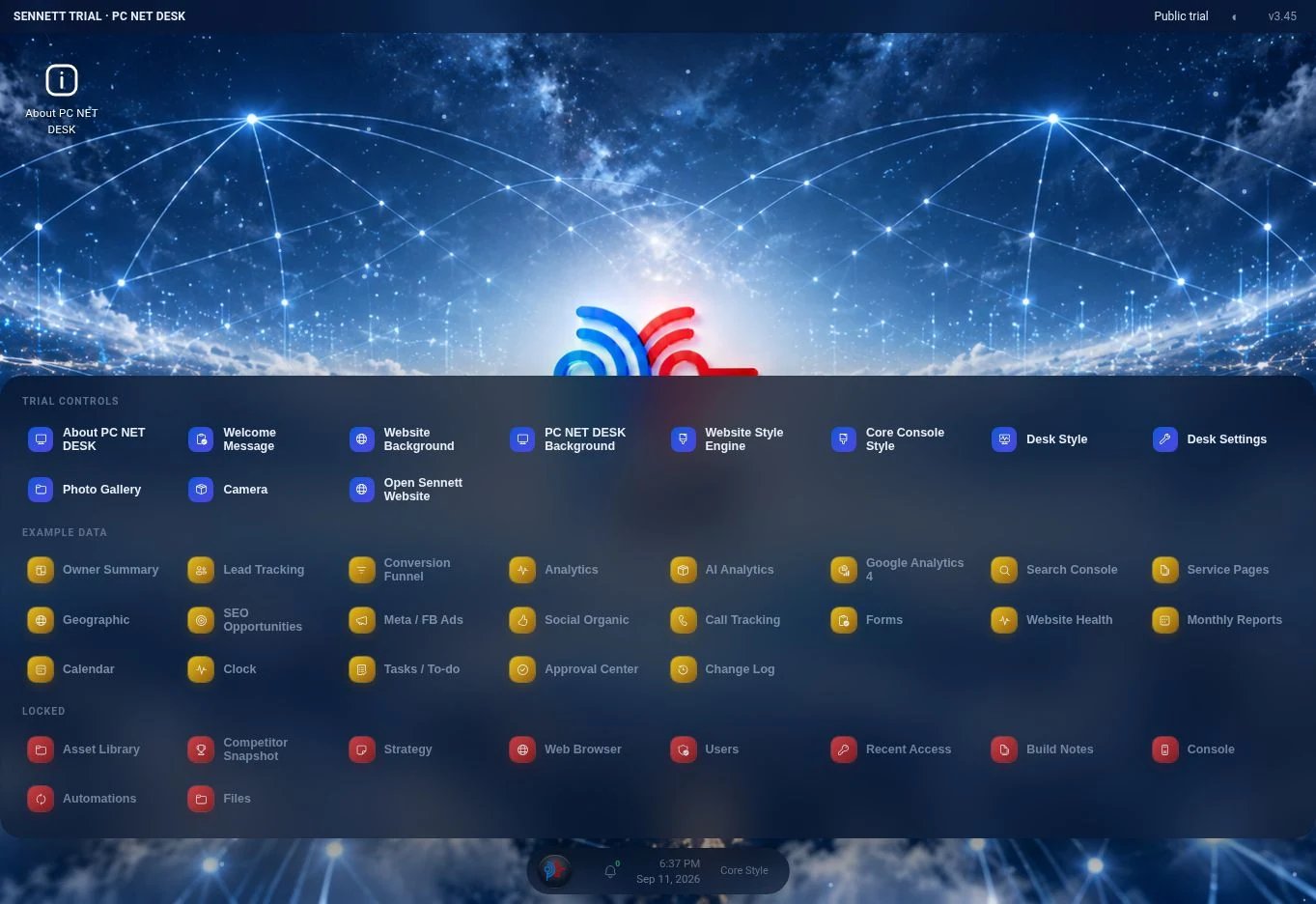 Enlarge interface ↗
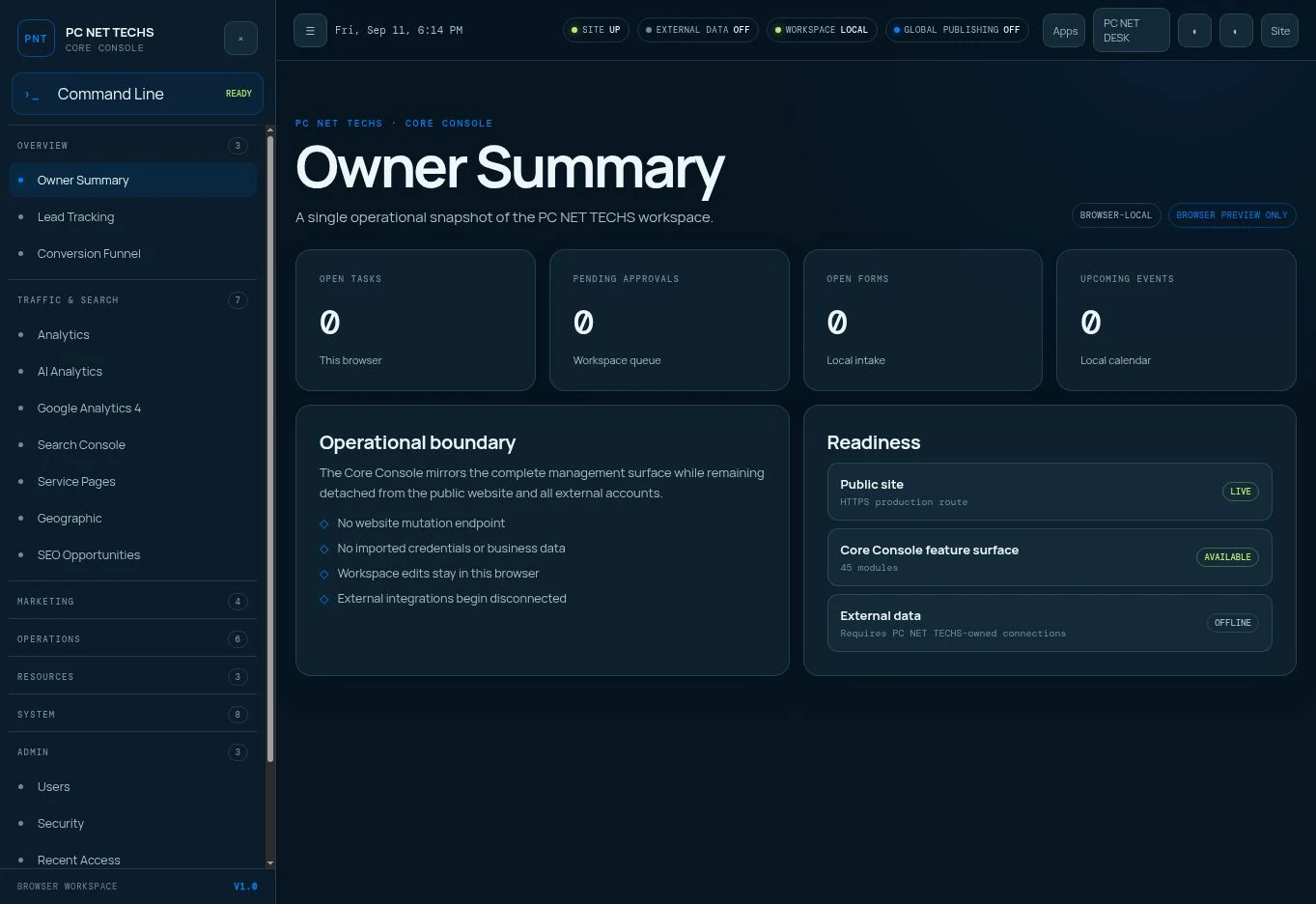 Enlarge interface ↗
02 / STACK & FRAMEWORK
The application stack.
These are resolved versions from the reviewed implementation, not a claim about the latest available release. Astro renders the platform; TypeScript describes its logic; Wix supplies the managed runtime, identity, records, and media services.
| Technology / version | What it does | Why it belongs |
|---|---|---|
Astro5.18.2 | Server-rendered pages, layouts, components, and API routes. | HTML arrives with resolved content and settings. Interactive tools add browser JavaScript where needed. |
TypeScript5.9.3 | Strictly checked application code, schemas, endpoint types, and shared services. | Named types make contracts easier for developers and agents to inspect; runtime validators still check requests. |
Wix Astro integration2.63.0 | @wix/astro, with @wix/astro-pages 2.0.4 and @wix/cloud-provider-fetch-adapter 1.0.4. | Connects Astro to the Wix-managed headless runtime, page handling, and release workflow. |
Wix Data + SDK1.0.480 / 1.21.12 | Server-side collection reads and writes through the shared Wix service layer. | Business records, style choices, and published content persist beyond an individual browser. |
Wix Members + Media1.0.481 / 1.0.259 | Member identity, account preparation, and managed media uploads. | Reuses managed identity and image storage services across the administrative tools. |
React + Astro React18.3.1 / 4.4.2 | Installed UI integration alongside Astro components and native browser scripts. | Allows React components when needed. The principal Desk and Console interfaces are Astro and browser JavaScript. |
SimpleWebAuthn server13.3.2 | WebAuthn challenge generation and credential verification. | Provides a defined server implementation for passkey registration and authentication. |
Wix CLI1.1.226 | Development, build, preview, release, environment, and generation commands. | Keeps local and automated releases on the platform-specific build path. |
Browser platformHTML · CSS · JavaScript | DOM events, Fetch, localStorage, canvas effects, media capture, speech synthesis, and app manifests. | Uses familiar browser capabilities for interaction and device integration. |
The application uses output: "server" and @wix/cloud-provider-fetch-adapter. @astrojs/cloudflare is installed but is not the adapter selected in the reviewed configuration. The deployment contract is Wix-managed headless with a Fetch-compatible server runtime.
Framework context: Astro’s on-demand rendering model ↗. Platform-specific wiring is documented from this project’s configuration.
03 / RENDERING & STATE
What happens on a request.
- Resolve the request.
The route and middleware establish page context. Administrative pages resolve identity and access. CMS-enabled pages establish live, draft, or publication scope for this request.
- Load and resolve the data.
Shared services read content, structure, design, media, work records, and reporting. Defaults and overrides produce the values required by the components.
- Render the experience.
Astro composes HTML. CSS variables and theme files style it. Browser scripts provide windows, forms, commands, effects, text fitting, and other interactions.
- Persist a deliberate change.
A control sends a defined request to its endpoint. The endpoint checks its access rules and validates the operation, then uses the shared service to write the corresponding records.
Three places state lives
| Domain | Storage and contents | Purpose |
|---|---|---|
| Website appearance | SiteSettings, ColorSchemes, FxPresets Theme selections, custom palette definitions, backgrounds, motion, component sizing and reusable effect settings. | Shared records let multiple management surfaces resolve the same website design. |
| Builder state | HomepageCMS Scoped text overrides, repeater structure, style overrides, logo state, and the published-sites registry. | Separate draft and named publication records preserve a clear editing and release boundary. |
| Operational work | Tasks, approvals, monthly reports, notes, assets and change-log collections Business record IDs, content, status, dates, and available edit metadata. | Records survive a browser restart and remain available from the appropriate management tools. |
| Scheduled work | CcActions, CcCalendarEvents Action field/value/time/repeat/enabled/last-run data and calendar event records. | Turns plans into inspectable records with explicit timing. |
| Lead capture | WebsiteFormSubmissions Validated form data, source context, status, internal notes and timestamps. | Connects the public inquiry to a manageable follow-up record. |
| Identity and access | Authorized-user registry, passkeys, access logs and SecuritySettings Member references, seat/provisioning state, public-key credential metadata, access outcomes and policy. | Separates authentication, authorization and recorded activity. |
| Activity and integrations | First-party activity records and configured reporting sources Page visits, referrers, AI crawler classification, search and campaign measures, calls and external research context. | Keeps the source of a measure visible alongside the operational conclusion drawn from it. |
| Device preferences | Browser localStorage Window geometry, local display choices, seen notifications and preview-only state where applicable. | Preserves an individual device’s workspace without treating it as the shared business database. |
Request-local state belongs to Astro.locals. The CMS resolves scope once and shares it across the page’s many fields. This avoids repeated member lookups without sharing an authorization result across different visitors.
Shared data caches are short-lived, in-memory caches: theme resolution uses roughly 60 seconds; CMS content, structure, logo, style, and the publication registry use roughly 30 seconds. Writes clear the relevant local cache. Another warm server instance can retain its own entry until expiry.
The Wix update helper reads and merges a record before writing its full data, preserving fields a caller did not change. Concurrent edits still need care: read/merge/write is not an atomic compare-and-swap, and cache invalidation is not a cross-instance real-time broadcast.
04 / WEBSITE BUILDER ENGINE
A website is structured state.
The preview uses its real components.
The Builder binds editing controls to a schema instead of treating the page as an unstructured block of markup. Its Content, Style, and Preview surfaces operate on four coordinated state layers.
Content
Stable field IDs, text overrides, and scale. Original text and fitting bounds stay in the schema.
Structure
Ordered repeater IDs, dynamic fields, links, icons, nested product bullets, and section order.
Style
Draft-specific theme, palette, typography, icons, backgrounds, effects, and supported sizing.
Logo
Managed image reference and supported header/footer visibility choices.
/Current public website state.
cmsDraft=1Authorized editing preview.
/published/<slug>Independent saved publication.
How text and components stay usable
The base registry contains 124 fields across ten sections. Each field declares its role, original copy, character budget, line budget, and minimum/maximum scale. CMS-aware text components resolve those values; the shared fitting behavior adjusts within the allowed bounds. Those budgets help preserve a layout, but long copy still deserves a desktop and mobile review.
Ten repeater groups define the supported component types and item limits. Add, duplicate, delete, update, and reorder operations act on stable IDs. Grid groups use row-aware movement; product cards support one to eight nested bullets. Six middle sections can be rearranged, with Hero first and Contact last.
Registered copy does not include every functional value on a website. Contact channels, head metadata, form field labels, and animated stat numbers have separate implementation controls. Product wordmarks, links, and icons have dedicated repeater fields. FAQ visible content and structured data share the same resolved answers.
How publishing works
- Validate a destination.
Normalize a short name or accepted same-site publication URL to a lowercase slug of 1–32 letters, digits, or hyphens. Reject foreign hosts, nested paths, reserved names, and invalid boundaries.
- Write four target snapshots.
Copy draft content, structure, style, and logo to
site:<slug>records. The four writes run in parallel. - Register the publication.
After those writes succeed, update the published-sites registry. The route renders registered targets and returns 404 for unknown names. The main homepage is a separate scope.
A new target remains undiscoverable by its route until registered. Replacing an existing target is not an atomic four-record transaction: if a write fails, inspect all four layers before retrying or declaring completion. A text reset restores text; it does not restore deleted structure or roll back a publication.
 Enlarge interface ↗
 Enlarge interface ↗
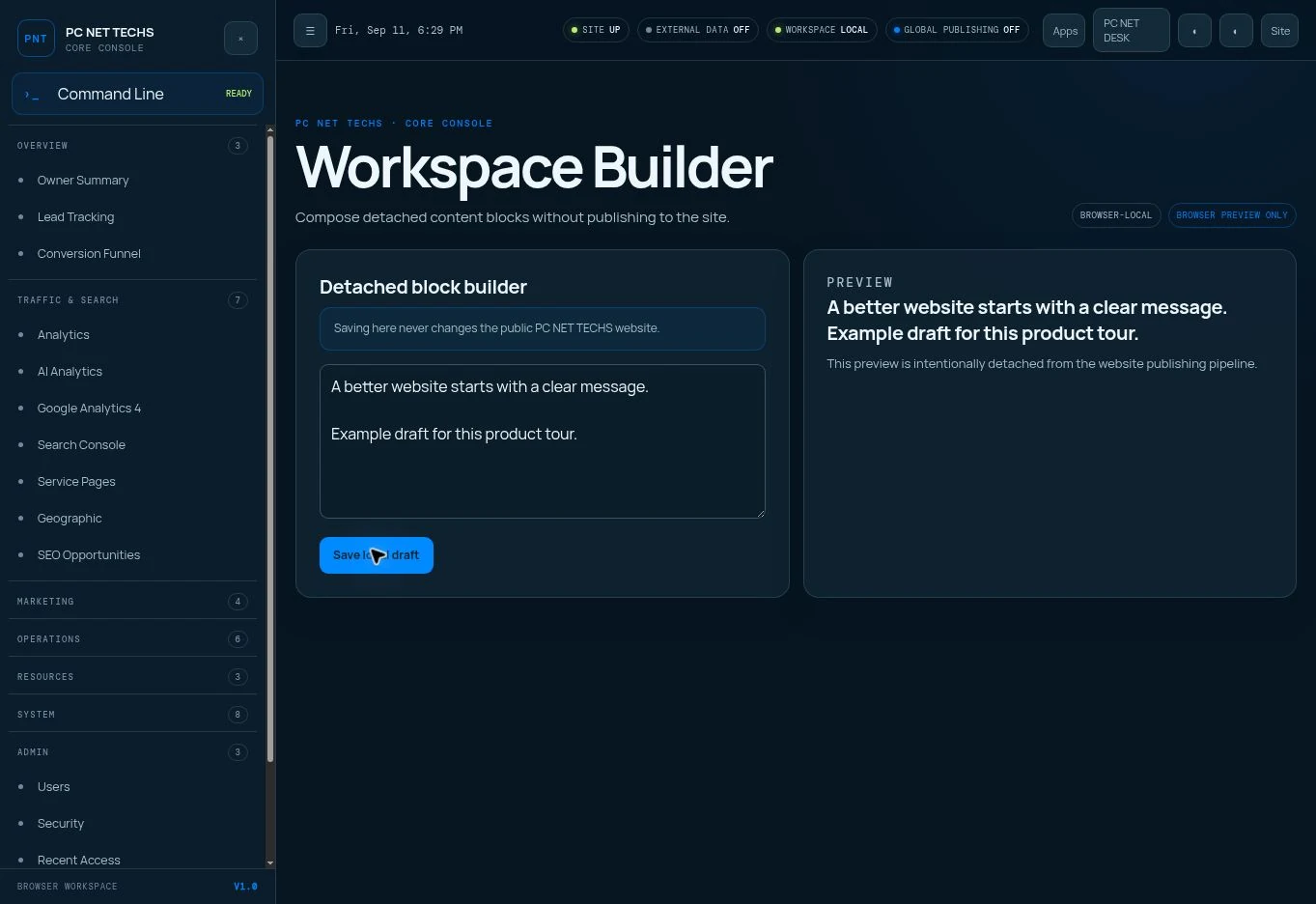 Enlarge interface ↗
05 / WEBSITE STYLE ENGINE
Design choices become
coordinated rendering rules.
The Style Engine resolves a selected website, its theme and custom palette, independent type/icon choices, background controls, and component settings into a typed design object. Components and CSS consume that object. The resolved Themes interface contains 133 properties, including derived CSS outputs.
Three independent surfaces
Website, Core Console, and Desk have separate appearance settings. Desk starts with its Console equivalents until explicitly customized. The main and Sennett website targets also have separate settings records.
Coordinated choices
Six theme families, six icon families, five font families, and eight built-in palettes provide starting points. Custom palettes define five brand color roles and six neutral roles across website and Console light/dark contexts.
Motion with defined inputs
Ten effects plus Off share normalized parameters, two colors, optional mobile rendering, four combinable cursor interactions, click/tap response, and double-click boost. A saved preset can reproduce a preferred configuration on a selected surface.
Readability and proportion
Desktop/mobile backgrounds and overlays are separate. Six element scales coordinate padding, icons, and radii. Mobile reading glass and direct background blur use independent scroll ramps with a shared quartic ease-out curve.
The current per-page image registry contains the Contact page. Missing page overrides inherit website backgrounds. To add another page, register its ID and give the layout that pageBgId. Console panels, header, and menu can use default, flat, glass, or gradient treatments with color and opacity.
One palette role can consistently affect buttons, accents, and related components. A component-size control changes several dimensions together. The operator changes a meaningful design decision; the renderer carries it through the page.
06 / WEBSITE AUTOMATIONS
Saved intent.
Due-work execution.
A scheduled action stores name, field, value, runAt, repeatKind, enabled, and lastRunAt. Its field must exist in the 32-entry registry. The same registry supplies the editing UI and server value validation.
What starts the runner?
Website and Console renders check for due work, throttled to one real check per minute per running instance. A GitHub workflow checks the public, input-free /api/cc/actions-run route every 15 minutes during quiet periods.
What does it do?
The runner filters enabled, due actions, checks Emergency Lock, orders due work, applies validated website values, clears its theme cache, records execution, and advances daily/weekly schedules beyond the current time.
Later due values win when several actions target the same setting. A theme action also selects its matching font and icon family. One-time actions do not imply a later reversal: schedule a separate restoration action when a temporary treatment should end.
This is a best-effort due-work scheduler, with stored execution markers. It is not an exact-second timer or a distributed exactly-once job system. Delayed checks and partial failures require inspecting the action and resulting setting. The scheduler changes registered main-website settings; Builder publication is a separate operation.
07 / ANALYTICS & INTELLIGENCE
Every observation
needs its source.
Connected reporting brings website behavior, acquisition, search, campaigns, calls, and competitor research into the same environment as the tools used to act on them. The first-party collector and provider reports contribute different pieces of the picture.
| Question | How it is answered | What the answer means |
|---|---|---|
| Who visited? | First-party records group IP/network context, user agent, available organization/location enrichment, and recorded contact identity when supplied. | A network or company estimate is context, not proof that a particular named person visited. |
| Where did they come from? | Referrers, landing pages, campaign parameters, GA4 acquisition and supported AI referrals. | Direct or missing referrers can leave attribution incomplete. Compare source definitions consistently. |
| What did they look at? | Page paths, pageviews, landing/exit information and ordered activity records. | Shows observed interest in content and the path taken through the site. |
| How long did they look? | Connected engagement/session reporting and recorded event timing. | Engagement time, elapsed visit time, and page-to-page gaps are different measures; a pageview alone does not prove attention. |
| What did they click? | Instrumented events for navigation, buttons, phone links, forms and other configured interactions. | A click is an action. A submitted form or provider-recorded call is a distinct outcome. |
| Why did they visit? | Interpret source, page sequence, repeat interest, search demand, and inquiry content together. | Intent is inferred from evidence unless the visitor explicitly states a reason. |
First-party collection and enrichment
The tracking route accepts bounded activity context, derives network information from the request, and uses an IP lookup for available city, region, country, and organization estimates. User-agent classification separates recognizable bots from human activity. AI reporting identifies supported crawler signatures and referral sources. A crawler access does not establish that an AI answer recommended the business.
Competitor analysis and analytics
Competitor reporting combines connected search visibility, content coverage, service positioning, reputation signals, website experience, and provider estimates where supplied. Those comparisons reveal gaps to address in copy, page structure, offers, and campaigns. A competitor’s private visitor identities, clicks, or session paths are not available from its public website; those detailed first-party measures describe the owned site.
Use reporting to identify a weak page or acquisition path, record the work, build a better page, publish deliberately, and compare consistent periods afterward. Source, reporting window, instrumentation, and missing data are part of that interpretation.
08 / AI & AGENT INTERFACE
Ready for agents.
Defined enough to operate.
PC NET DESK was created for agent use. Its strongest existing interface is a discoverable command registry that calls the same functions as supported visual apps. Structured content, typed settings, stable record IDs, inspectable source, and explicit scopes give agents useful context for planning and verification.
POST /api/cc/console
One registered command per request, issued on the platform origin with an authorized session. The server truncates the command string to 500 characters; agents should keep requests within that limit.
{
  "command": "tasks"
}Output you must inspect
Successful dispatch returns output lines and an explicit command-error flag. The lines remain human-readable strings, not a universal typed business-record schema.
{
  "ok": true,
  "lines": [
    "…current task records…"
  ],
  "isError": false
}
A minimal, read-only request example JavaScript
// Run only inside an authorized session on the platform origin.
// An external agent integration must supply its own approved adapter.
const response = await fetch('/api/cc/console', {
  method: 'POST',
  credentials: 'same-origin',
  headers: { 'Content-Type': 'application/json' },
  body: JSON.stringify({ command: 'tasks' })
});
const result = await response.json();
if (!response.ok || result.ok !== true || result.isError === true) {
  throw new Error('Command did not complete successfully');
}
// Inspect result.lines; after a write, re-read the affected record.
A handler can return HTTP 200 with ok: true and isError: true. Check the HTTP result and the error flag. Invalid JSON returns 400; missing sign-in or required passkey verification returns 401; unauthorized membership returns 403. Handler output is still needed to interpret the business result.
{
  "ok": true,
  "lines": [
    "Unknown command. Type help."
  ],
  "isError": true
}
A useful agent operating sequence
- Discover and read.
Use
help,help task, and the relevant read command. Obtain real record IDs, current values, and the intended scope. - Choose one authorized operation.
Keep the command narrow. Review whether it creates, replaces, deletes, approves, changes access, or publishes. The
note setcommand replaces shared note content;actions runcan change the website. - Inspect and verify.
Check transport and command errors, then re-read the record or rendered page. After an ambiguous timeout, inspect current state before retrying a write to avoid duplication.
Command-level mutation flags are useful but do not fully describe mixed families: lock and actions perform their own subcommand checks. Some families are marked mutating even when their selected subcommand reads. Access logging is implemented on supported paths and is best effort; do not assume a transactional audit of every possible operation.
What an agent can use now
An authorized browser can operate the visual tools and console. The HTTP command route exposes the registered operations within that session model. CMS endpoints expose field, structure, style, logo, and publication operations under their own guard.
Where an adapter fits
A dedicated agent integration supplies authentication, tool mapping, scoped permissions, and result verification. The reviewed source does not bundle an LLM, autonomous planner, MCP server, or public API-key agent SDK. Those can be built around the existing operations.
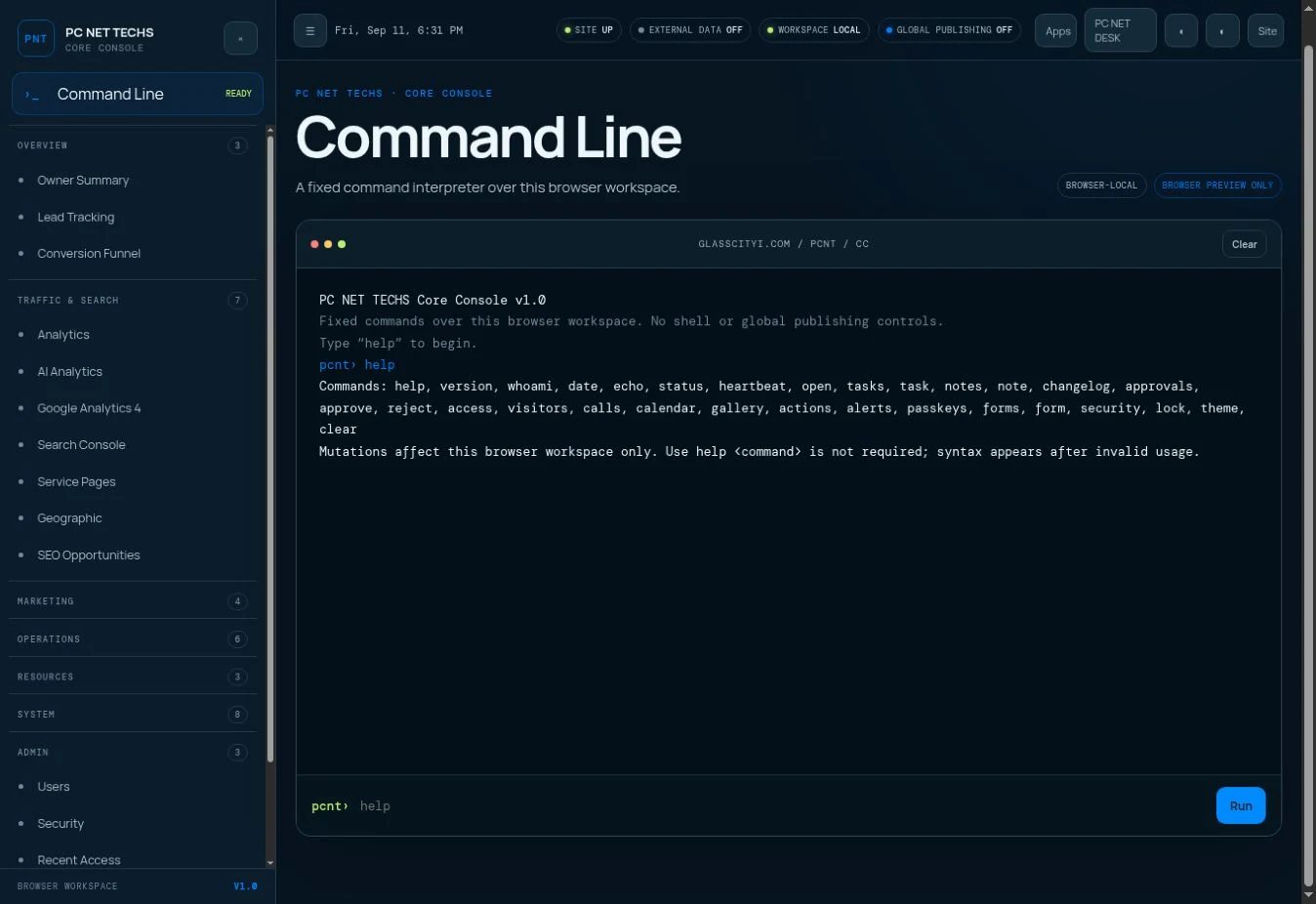 Explore the command interface ↗
09 / IDENTITY & ACCESS
Identity, authority,
and operational control.
Wix member identity answers who is signed in. The explicit authorization registry controls who can use the management platform. Endpoint and command checks determine which operation that identity may perform. Configured passkey enforcement and Emergency Lock add controls on their implemented paths.
Shared middleware adds configured passkey verification across administrative pages and API prefixes after a Wix member is present. Passkey ceremonies, the verification page, and Emergency Lock recovery have deliberate exceptions so access can be established or recovered. Each route still owns its membership and operation checks; middleware does not replace those guards.
Account provisioning
The administrator supplies a name and email. The service reserves a finite account seat, prepares or reuses the Wix member, approves it, records platform authorization, and requests a set-password email. The reviewed source caps authorized accounts at ten. New members are ordinary users; email acceptance is recorded separately from delivery.
Passkeys
The browser creates or proves possession of a WebAuthn credential. Server-generated challenges and verification bind the result to the relying party and member. Stored records hold public-key credential metadata. Management lists, renames, and revokes credentials; administrator controls govern enforcement.
Policy and visibility
IP policy, denied-access alerts, recent access, and administrative response headers provide additional controls and review context. Exact authorization differs by endpoint; the inventory describes those boundaries instead of treating all routes as interchangeable.
Lock and recovery
Emergency Lock interrupts protected writes and due-action execution. Recovery has a deliberate credential-based path. The public contact form remains available so an administrative incident does not stop the business from receiving inquiries.
Passkey library context: SimpleWebAuthn ↗. The API reference describes this platform’s specific use of that library.
10 / BROWSER & INSTALLED APPS
A web platform
with a desktop vocabulary.
Desk’s browser code manages the launcher, taskbar, notification tray, window focus, drag, resize, minimize, maximize, snapping, and layout persistence. On smaller screens, apps become full-screen views and desktop window manipulation is disabled. The shared data stays on the server; each device remembers its workspace locally.
Installation
The website, Console, and Desk have separate app identities and start URLs: /app, /core-console, and /core-console/desk. Manifests request standalone presentation. Browser support determines the install experience; an installed shell does not imply offline administrative data or background synchronization.
Media and camera
Gallery uploads obtain a managed upload URL, send the image, and finish with a media readiness check and stored reference. Logo upload follows its own scoped flow. The Camera app uses browser permission and device media capture before placing an image in the supported media workflow.
Presentation and speech
Demo and Presentation modes organize guided walkthroughs. Voice Mode uses browser speech synthesis and device voices with user-controlled playback. Availability depends on the browser; it is distinct from an AI conversation system.
Files and embedded browsing
Files reads a source bundle included at build time through raw imports; it is not a live server filesystem editor. Browser windows embed destinations that permit framing, with external navigation where offered. A destination’s security headers still apply.
11 / BUILD & DEPLOYMENT
Two codebases.
Two deployment paths.
Wix-managed release
ES modules, Astro 5, strict TypeScript, server output, and Wix integration. Package scripts wrap wix dev, wix build, wix preview, and wix release, with generation and environment tooling alongside them.
Branch pushes run the preview workflow: install from the lockfile, type-check, build, and create a Wix preview. Main pushes run the release workflow: install, build, and release to production. Reviewed workflows specify Node 20. Repository-managed secrets supply deployment credentials and environment configuration.
Glass City Intelligence
The product and technology guides use Astro 7.2.2, TypeScript 5.9.3, and the Vercel adapter 11.0.5 in the existing GCI project. These routes render as static HTML, with small browser scripts for search and screenshot viewing.
They use self-hosted fonts, optimized interface images, and the PC NET TECHS favicon. They are noindex reference pages outside the sitemap. The JSON and text references are static documentation; they do not activate a copy of the platform backend on glasscityi.com.
Deployment details that affect behavior
Server output and the selected adapter are part of the PC NET DESK runtime contract. Framework upgrades should follow integration compatibility checks. The active source directory determines which routes deploy. Generated bundles, caches, and local previews are build artifacts, not the editable source of truth.
Search discovery routes such as robots.txt and the sitemap may be served by Wix’s managed edge rather than the repository route. Verify the serving layer when changing them. The application’s versioned favicon filename also avoids relying on a hosting-reserved favicon path.
12 / FILE TYPES
What each file is for.
| File type | Role and mechanism | Advantage |
|---|---|---|
.astro | Pages, layouts and components Server frontmatter resolves data; the template emits HTML; styles and scripts supply presentation and interaction. | Keeps rendering close to the component that owns it. |
.ts | .ts API routes, services and registries Typed functions implement commands, data operations, validation, scheduling and file-based endpoints. | Makes behavior and contracts discoverable in code. |
.d.ts | Environment declarations Declares platform types and request-local state to the TypeScript checker. | Lets the application describe values supplied by the runtime. |
.mjs | ES module configuration astro.config.mjs selects integrations, output mode and the production adapter. | Makes the build target explicit. |
.js | Browser/runtime JavaScript Compiled TypeScript and component scripts run in the browser or server bundle as appropriate. | Delivers behavior in the runtime’s native language. |
.css | Design systems and component styling Theme files, custom properties, media queries and mode rules style the website and administrative surfaces. | Lets settings change presentation through a coordinated system. |
.json | Package, lock and structured data package.json defines scripts and dependencies; package-lock.json records resolved dependency versions. Serialized records carry content and settings. | Makes data portable and dependency resolution reproducible. |
.webmanifest | Installed app identity JSON manifests describe start URLs, scope, display mode, icons and application names. | Separates website, Console and Desk installation identities. |
.yml | GitHub workflows Preview, release and heartbeat workflows define triggers and ordered automation steps. | Keeps deployment and recurring checks inspectable. |
.md / .txt | Human and machine documentation AGENTS.md and CHANGELOG.md preserve operating knowledge; public llms.txt provides a discovery summary. | Improves handoff between people, tools and agents. |
.svg / .png / .jpg / .webp | Icons, logos, backgrounds and images Vector and raster assets are selected for their visual role; managed uploads resolve to media URLs. | Keeps reusable media separate from page copy and behavior. |
.xml | Search discovery output The repository includes a sitemap route. Platform-managed search routes can take precedence in production. | Documents discoverable URLs while recognizing which hosting layer serves them. |
13 / EXTENDING THE SYSTEM
Build on the contracts.
New capabilities fit best when their interface, shared behavior, data, permissions, and verification are designed together. These are the main extension points in the reviewed architecture.
A new management app
Add a cc component, register the dashboard/Desk entry, connect a shared service and protected endpoint where needed.
Keep visual rendering and business operations separate so another interface can reuse the same operation.
A new agent command
Add a COMMANDS entry with usage, summary, handler, mutation/admin classification and the necessary lock checks.
Expose a narrow operation, return an explicit error result, and verify the resulting state. Mixed command families need subcommand review.
A new content field
Register its ID, section, role, original copy and fit bounds; render it with the CMS-aware text component.
Keep original content, visible copy, preview behavior and machine discovery in agreement.
A new repeater or section
Define its template, stable field mapping, limits and renderer. Extend structure operations for any new field type.
Ensure duplicate, delete and reordering preserve valid identities and component boundaries.
A new theme or style control
Add the theme/style definition, server validator, UI control, persisted value and rendering rule for the intended surface.
Updating a dropdown alone does not make a new theme or setting functional.
A new scheduled setting
Extend FIELD_DEFS, value validation and the website settings writer, then expose the control in Actions.
Use a value that the live renderer already understands; do not silently treat publication as a style setting.
A new reporting source
Connect a server-side provider adapter, map its metrics, preserve period/source attribution and supply the module data.
Keep measured events, enriched estimates and inferred intent distinguishable.
An agent adapter / MCP tool
Implement a separately authenticated integration that maps approved tools to the existing narrow operations.
The reviewed repository supplies commands and HTTP routes; it does not bundle an LLM, MCP server, API-key agent SDK or autonomous planner.
14 / COMPLETE IMPLEMENTATION INVENTORIES
Find the exact
command, field, route, or file.
The inventories below enumerate the reviewed registries and source tree. Open a collection to browse it, or search across names, descriptions, paths, fields, and rules. Dynamic content items extend the base schema at runtime.
Complete dependency inventoryEvery declared package, version range, locked version and purpose20
These are all direct dependency declarations in the reviewed package.json. Locked versions come from package-lock.json. The dependency/devDependency label records the manifest grouping; it does not by itself establish whether bundled code runs in a browser or on the server. Transitive dependencies are resolved by the lockfile.
@simplewebauthn/server
Locked 13.3.2 · declared ^13.3.2 · dependencies
Generates and verifies WebAuthn registration/authentication challenges.
@wix/astro
Locked 2.63.0 · declared ^2.63.0 · dependencies
Connects the Astro application to Wix headless services and tooling.
@wix/astro-pages
Locked 2.0.4 · declared ^2.0.4 · dependencies
Integrates Wix page handling with Astro.
@wix/dashboard
Locked 1.3.45 · declared ^1.3.36 · dependencies
Installed Wix dashboard integration package; the reviewed application source has no direct import.
@wix/data
Locked 1.0.480 · declared ^1.0.480 · dependencies
Provides collection queries and writes for persistent records.
@wix/essentials
Locked 1.0.8 · declared ^1.0.6 · dependencies
Supplies server-side elevation and authenticated service calls used by the Wix helper and CMS stores.
@wix/media
Locked 1.0.259 · declared ^1.0.0 · dependencies
Supplies managed media upload and file-service operations.
@wix/members
Locked 1.0.481 · declared ^1.0.481 · dependencies
Supplies member identity and account preparation operations.
@wix/sdk
Locked 1.21.12 · declared ^1.21.5 · dependencies
Provides the shared Wix SDK/client layer.
astro
Locked 5.18.2 · declared ^5.8.0 · dependencies
Renders application pages/components and supplies file-based API routing.
typescript
Locked 5.9.3 · declared ^5.8.3 · dependencies
Checks typed application code and registry contracts.
@astrojs/check
Locked 0.9.9 · declared ^0.9.9 · devDependencies
Runs Astro component diagnostics in the validation workflow.
@astrojs/cloudflare
Locked 12.6.13 · declared ^12.5.3 · devDependencies
Installed alternative adapter; the reviewed configuration selects the Wix cloud-provider Fetch adapter.
@astrojs/react
Locked 4.4.2 · declared ^4.3.0 · devDependencies
Enables React components in Astro when required.
@types/react
Locked 18.3.31 · declared ^18.3.1 · devDependencies
Provides React TypeScript declarations.
@types/react-dom
Locked 18.3.7 · declared ^18.3.1 · devDependencies
Provides React DOM TypeScript declarations.
@wix/cli
Locked 1.1.226 · declared ^1.1.226 · devDependencies
Runs Wix development, build, preview, release and related commands.
@wix/cloud-provider-fetch-adapter
Locked 1.0.4 · declared ^1.0.0 · devDependencies
The selected production adapter for the Wix-managed Fetch-compatible runtime.
react
Locked 18.3.1 · declared 18.3.1 · devDependencies
Installed component runtime available through the Astro React integration.
react-dom
Locked 18.3.1 · declared 18.3.1 · devDependencies
Provides the rendering layer for React components.
No entries match. Try a broader term or clear the search.
Every Console componentApplication panels, presentation controllers and shared UI helpers44
AI Analytics
Classifies recognized AI crawlers and supported AI referrals.
src/components/cc/AiAnalytics.astroFirst-party Analytics
Groups recorded visits, network context, paths and time information.
src/components/cc/Analytics.astroApproval Center
Records approval and rejection decisions for tracked work.
src/components/cc/Approvals.astroAsset Library
Organizes reusable business assets and references.
src/components/cc/AssetLibrary.astroBuild Notes
Presents implementation and operating knowledge within the platform.
src/components/cc/BuildNotes.astroCall Tracking
Displays configured call-provider activity and attribution.
src/components/cc/CallTracking.astroActions
Creates, edits, enables and removes scheduled website setting changes.
src/components/cc/CcActions.astroCalendar
Maintains dated work and calendar events.
src/components/cc/CcCalendar.astroChange Log
Records delivered platform changes and version context.
src/components/cc/ChangeLog.astroClient Notes
Keeps shared strategy and operating notes.
src/components/cc/ClientNotes.astroClock & heartbeat
Shows current time and recorded heartbeat context.
src/components/cc/Clock.astroCore Console Style
Controls dashboard-specific appearance.
src/components/cc/CommandCenterStyle.astroCompetitor Analysis
Compares search presence, content, services and other connected research.
src/components/cc/Competitors.astroConsole
Provides the command input/output interface for registered operations.
src/components/cc/Console.astroContent Management
Edits the supported welcome/hero message and related website content controls.
src/components/cc/ContentManagement.astroDemo Mode controller
Orchestrates the guided demonstration.
src/components/cc/DemoMode.astroDemo panel
Presents the demonstration’s explanation and controls.
src/components/cc/DemoPanel.astroEmergency Lock indicator
Keeps lock state and recovery controls visible.
src/components/cc/EmergencyLockBadge.astroIcon renderer
Maps semantic icon names to the selected icon family.
src/components/cc/FluentIcon.astroForms
Lists inquiries and updates status or follow-up notes.
src/components/cc/FormsPanel.astroConversion Funnel
Shows the recorded stages between arrival and inquiry.
src/components/cc/Funnel.astroGoogle Analytics 4
Presents connected acquisition, engagement and event reporting.
src/components/cc/Ga4Panel.astroGeographic
Summarizes available location estimates for website attention.
src/components/cc/Geographic.astroWebsite Health
Surfaces connected performance, availability and health indicators.
src/components/cc/HealthMonitor.astroLead Tracking
Presents inquiry source, stage and follow-up context.
src/components/cc/LeadTracking.astroMeta Ads
Shows paid social delivery, spend, leads and cost measures.
src/components/cc/MetaAds.astroMonthly Reports
Organizes recurring performance and work summaries.
src/components/cc/MonthlyReports.astroDesk Style
Controls the windowed workspace independently.
src/components/cc/OsStyle.astroOwner Summary
Brings traffic, inquiries and priorities into a starting view.
src/components/cc/OwnerSummary.astroPresentation controller
Sequences the platform presentation.
src/components/cc/PresentationMode.astroPresentation panel
Provides the presentation’s visual controls and content.
src/components/cc/PresentationPanel.astroRecent Access
Reviews recorded administrative access and outcomes.
src/components/cc/RecentAccess.astroColor Scheme Builder
Builds named brand palettes and neutral color sets.
src/components/cc/SchemeBuilder.astroSearch Console
Reports connected queries, pages, visibility and search response.
src/components/cc/SearchConsole.astroSecurity alert banner
Surfaces unacknowledged access concerns.
src/components/cc/SecurityAlertBanner.astroSecurity
Manages supported policy, passkey and alert controls.
src/components/cc/SecurityPanel.astroSEO Opportunities
Turns search performance gaps into potential improvements.
src/components/cc/SeoOpportunities.astroService Pages
Compares page-level interest and inquiry behavior.
src/components/cc/ServicePages.astroSocial Organic
Reports organic reach, audience and post response.
src/components/cc/SocialOrganic.astroWebsite Style Engine
Controls website themes, colors, typography, backgrounds and effects.
src/components/cc/StyleEngine.astroTasks
Creates and tracks work to completion.
src/components/cc/Tasks.astroUsers
Lists authorized users and provides administrator account provisioning.
src/components/cc/Users.astroVoice controller
Coordinates browser speech synthesis and playback state.
src/components/cc/VoiceMode.astroVoice panel
Provides the narration controls and available device voices.
src/components/cc/VoicePanel.astroCommand registryExact syntax, behavior, mutation scope and operating notes27
help
Read / inspectList all commands, or show usage for one.
help [command]Start with help, then help <command>. Syntax is a fixed command vocabulary, with double quotes for arguments containing spaces.
version
Read / inspectCore Console / PC NET DESK version.
versionUses the authorized command context and the registered handler. Inspect the result and verify any affected state.
whoami
Read / inspectCurrent signed-in member and admin status.
whoamiUses the authorized command context and the registered handler. Inspect the result and verify any affected state.
date
Read / inspectCurrent date/time (Eastern).
dateUses the authorized command context and the registered handler. Inspect the result and verify any affected state.
echo
Read / inspectPrint text back.
echo <text>Uses the authorized command context and the registered handler. Inspect the result and verify any affected state.
status
Read / inspectCombined system status: lock, passkeys, heartbeat.
statusUses the authorized command context and the registered handler. Inspect the result and verify any affected state.
heartbeat
Read / inspectActions heartbeat detail.
heartbeatReads heartbeat timing and counts; it does not run a resident background worker.
lock
Mixed / inspect subcommandEmergency Lock status and control.
lock status | lock enable [reason] | lock disable <phrase>Mixed read/write family. Each subcommand applies its own rules; the registry-wide mutates flag is false. Recovery uses a separately held secret.
tasks
Read / inspectList tasks.
tasksUses the authorized command context and the registered handler. Inspect the result and verify any affected state.
task
Changes recordsManage tasks.
task add "<title>" ["<impact>"] | task done <id> | task undone <id> | task rm <id>add creates a task; done and undone change status; rm removes the selected record. Read tasks to obtain the current ID.
notes
Read / inspectShow the shared notes.
notesUses the authorized command context and the registered handler. Inspect the result and verify any affected state.
note
Changes recordsReplace the shared notes content.
note set "<content>"set replaces the shared note content. Read notes first to avoid overwriting information unintentionally.
changelog
Read / inspectShow the last n changelog entries (default 10).
changelog [n]Uses the authorized command context and the registered handler. Inspect the result and verify any affected state.
approvals
Read / inspectList approvals.
approvalsUses the authorized command context and the registered handler. Inspect the result and verify any affected state.
approve
Changes recordsMark an approval approved.
approve <id>Records an approval decision for the chosen item. It does not automatically publish a Builder page.
reject
Changes recordsMark an approval rejected.
reject <id>Records a rejection decision for the chosen item. It does not undo a previously deployed change.
access
Read / inspectRecent access log, grouped by IP (default 10 groups).
access [n]Reads grouped access history with recorded outcomes. Availability depends on what each access path records.
visitors
Read / inspectLast n distinct-IP website visits (default 5).
visitors [n]Lists recent distinct-IP visits. An IP-grouped record is not proof of a named person’s identity.
calls
Read / inspectCall stats (CallRail if connected, otherwise sample data).
callsReads the configured call-tracking feed. A call record and a click on a telephone link represent different events.
calendar
Read / inspectList calendar events (read-only — add/edit via the Calendar app).
calendarThis command lists calendar events. Create and edit events through the visual app or its separate endpoint.
gallery
Read / inspectList gallery image URLs (read-only — the picker grid is visual).
galleryReturns gallery image URLs. Uploading, selecting and camera capture use the visual/media workflow.
actions
Mixed / inspect subcommandScheduled Actions: list, run due actions now, or show valid fields.
actions [list|run|fields]list reads schedules; fields lists schedulable settings; run applies already-due work and changes state. run checks its lock gate inline.
alerts
Admin · Mixed / inspect subcommandUnacknowledged security alerts, or acknowledge all (admin only).
alerts [ack]Admin-only. The entire family is marked as mutating, including the listing form. ack acknowledges alerts.
passkeys
Mixed / inspect subcommandList/rename/revoke your passkeys; admin can toggle enforcement.
passkeys [list] | passkeys rename <id> <name> | passkeys revoke <id> | passkeys enforce on|offManagement operates on authorized passkeys; enforcement is admin-only. The entire family is marked as mutating, including list.
forms
Read / inspectRecent website form submissions (default 10; 'new' filters to unworked).
forms [n] | forms newReads submissions, with an optional limit or the new-only filter. Form records include contact details and should stay within authorized reporting.
form
Changes recordsWork a submission: set status or replace its notes.
form status <id> new|contacted|closed | form note <id> "<text>"Changes one record’s status or note. Status is one of new, contacted, or closed.
security
Admin · Mixed / inspect subcommandSecurity settings — admin only.
security [show] | security ip add|rm <ip> | security ip on|off | security notify on|offAdmin-only. Lists or changes configured IP, notification and security settings. The family is marked as mutating even for show.
API route inventoryMethods, request purpose, contracts and access boundaries24
Paths below belong to the PC NET DESK application origin. They are descriptive text here, not controls for the documentation site. The shared passkey middleware and route-specific guards must both be respected by an integration.
/api/cc/actions-run
Run already-due website actionsGET or POST with no input; returns ok, ran and, when applicable, locked.
Access: Public by design; cannot create an action or accept an arbitrary setting. Emergency Lock suppresses execution.
/api/cc/actions
List and maintain schedulesGET lists; POST accepts add, update, or deleteId. An action has name, field, value, runAt, repeatKind, and enabled.
Access: Authorized member for access; writes apply the endpoint’s lock gate. Values come from FIELD_DEFS.
/api/cc/calendar
Maintain calendar recordsPOST accepts add, update (including id), or deleteId.
Access: Authorized member and mutation lock checks; calendar command is a separate read path.
/api/cc/console
Execute a registered commandPOST { command: string }; returns lines and isError alongside ok.
Access: Explicitly authorized member; configured passkey enforcement; additional command-level authorization and lock handling.
/api/cc/emergency-lock
Inspect, enable and recover the lockGET reads state. POST action enable records a reason; action disable supplies the recovery credential.
Access: Enable uses administrative membership. Recovery deliberately has a distinct credential-based path.
/api/cc/forms
Review and update contact submissionsPOST action list; action status with id and status; action notes with id and notes.
Access: Authorized access and operation-specific mutation checks.
/api/cc/fx-presets
Save or remove named effect presetsPOST { name, config } saves; { deleteId } removes. Apply a preset through the normal theme controls.
Access: Authorized member; preset validation and mutation lock check.
/api/cc/gallery
Browse and upload managed imagesGET lists. POST supports upload, finalize and delete operations; upload receipts are completed through the media service.
Access: Main administrative access is guarded. Sennett trial has a separate, restricted upload/ownership path.
/api/cc/log-ip
Record an administrative network visitPOST resolves request and member context for access/visit records.
Access: Administrative logging route; its request context determines the recorded identity.
/api/cc/mutate
Mutate supported business collectionsPOST { entity, op, payload }; entities: tasks, changelog, approvals, monthly, notes, assets. Operations: create, update, delete, notes.
Access: Member and allowlist check plus Emergency Lock. Its checks are separate from the console and passkey endpoints.
/api/cc/security
Inspect and maintain security policyGET reads allowed settings; POST selects the implemented save, IP-check or access-verification operation.
Access: Action-specific member, administrator, and verification rules. Do not treat every operation as an equivalent access contract.
/api/cc/source
Browse the source bundled with this buildGET lists files; GET ?path=<known path> returns text for that exact bundled path.
Access: Authorized member. Read-only; unavailable paths return 404. No live filesystem access.
/api/cc/theme
Update website or workspace appearancePOST selects a supported theme, palette, font, icon, background, effect, size, or surface operation. Separate selectors choose website and workspace targets.
Access: Administrative permission and target restrictions; Sennett trial follows its own narrower rules. Validate one intended operation per request.
/api/cc/users
Provision an ordinary platform accountPOST { email, name }; response includes the created/reused account and provisioning information.
Access: Explicit administrator, origin check, configured passkey check, Emergency Lock, and ten-account capacity enforcement.
/api/cc/webauthn
Register, authenticate and manage passkeysPOST actions: register-options, register-verify, auth-options, auth-verify, list, rename, revoke.
Access: Member identity, action-specific ownership/admin rules, server challenges and credential verification.
/api/cms/logo-upload
Change the draft logoPOST handles toggle, revertImage, upload and finalize. Upload goes through managed media; toggles select supported visibility flags.
Access: CMS authorization and lock guard. Writes draft scope.
/api/cms/publish
Publish the draft to a named pagePOST { slug }; copies content, structure, style and logo, then records the destination.
Access: CMS authorization and lock guard. Slug validation and all four snapshot writes must succeed before the registry update.
/api/cms/revert-all
Reset editable draft copyPOST resets all editable text overrides.
Access: CMS authorization and lock guard. This is a text reset, not a structure or publication rollback.
/api/cms/revert
Reset one draft text fieldPOST { id } restores the selected field’s original copy.
Access: CMS authorization and lock guard; field ID must resolve.
/api/cms/save
Save draft text and scalePOST { id, text, scale }; validates the registered field and its bounds.
Access: CMS authorization and lock guard; writes draft content.
/api/cms/structure
Edit draft componentsPOST action add, duplicate, delete, reorder or updateField; groupId plus the relevant itemId, fieldKey, value, direction and optional steps.
Access: CMS authorization and lock guard; validates group, item, field type and structural bounds.
/api/cms/style-save
Save the draft designPOST selects one supported style operation, such as { surface: "website", theme: "win11" }.
Access: CMS authorization and lock guard. Uses the supported draft-style subset, not every resolved Themes property.
/api/forms/submit
Accept a public business inquiryPOST submits the contact form fields; validation, a honeypot and per-instance throttling precede the stored submission.
Access: Public lead capture intentionally remains available during an administrative Emergency Lock.
/api/track
Record website activityTracking route records supported page and visitor context for first-party reporting.
Access: Public collection path; server code determines accepted context. This does not expose private visitor records.
Base content field schemaAll field IDs, roles, character/line budgets and scale bounds124
Scale is a multiplier: 1 is 100%. Character and line budgets describe the registered fitting constraints. Original business copy is kept in the platform schema; this reference publishes the field contract.
Header / Nav
| Field / purpose | Role | Chars / lines | Scale |
|---|---|---|---|
header.brandBrand name | brand | 30 / 1 | 0.85–1.1 |
header.nav.servicesNav — Services | nav | 24 / 1 | 0.7–1.2 |
header.nav.serveNav — Who We Serve | nav | 24 / 1 | 0.7–1.2 |
header.nav.productsNav — Products | nav | 24 / 1 | 0.7–1.2 |
header.nav.whyNav — Why Us | nav | 24 / 1 | 0.7–1.2 |
header.nav.faqNav — FAQ | nav | 24 / 1 | 0.7–1.2 |
header.nav.contactNav — Contact Us | nav | 24 / 1 | 0.7–1.2 |
header.ctaHeader CTA button | button | 34 / 1 | 0.7–1.15 |
Hero
| Field / purpose | Role | Chars / lines | Scale |
|---|---|---|---|
hero.h1Headline | h1 | 140 / 4 | 0.55–1.15 |
hero.leadSubheading | lead | 320 / 5 | 0.65–1.15 |
hero.cta1Primary CTA button | button | 34 / 1 | 0.7–1.15 |
hero.cta2Secondary CTA button | button | 34 / 1 | 0.7–1.15 |
hero.badge1Trust badge 1 | badge | 40 / 1 | 0.65–1.2 |
hero.badge2Trust badge 2 | badge | 40 / 1 | 0.65–1.2 |
hero.badge3Trust badge 3 | badge | 40 / 1 | 0.65–1.2 |
hero.monitor.titleMonitor card title | label | 30 / 1 | 0.7–1.2 |
hero.monitor.row1.labelServers row — label | monitorLabel | 26 / 1 | 0.75–1.2 |
hero.monitor.row1.statusServers row — status | monitorStatus | 20 / 1 | 0.75–1.2 |
hero.monitor.row2.labelFirewalls row — label | monitorLabel | 26 / 1 | 0.75–1.2 |
hero.monitor.row2.statusFirewalls row — status | monitorStatus | 20 / 1 | 0.75–1.2 |
hero.monitor.row3.labelEndpoints row — label | monitorLabel | 26 / 1 | 0.75–1.2 |
hero.monitor.row3.statusEndpoints row — status | monitorStatus | 20 / 1 | 0.75–1.2 |
hero.monitor.row4.labelBackups row — label | monitorLabel | 26 / 1 | 0.75–1.2 |
hero.monitor.row4.statusBackups row — status | monitorStatus | 20 / 1 | 0.75–1.2 |
Stats Strip
| Field / purpose | Role | Chars / lines | Scale |
|---|---|---|---|
stats.label1Stat 1 label (56) | statLabel | 40 / 2 | 0.7–1.2 |
stats.label2Stat 2 label (83) | statLabel | 40 / 2 | 0.7–1.2 |
stats.label3Stat 3 label (92) | statLabel | 40 / 2 | 0.7–1.2 |
stats.label4Stat 4 label (494) | statLabel | 40 / 2 | 0.7–1.2 |
stats.footFooter sentence | body | 160 / 2 | 0.65–1.2 |
Services
| Field / purpose | Role | Chars / lines | Scale |
|---|---|---|---|
services.eyebrowEyebrow | eyebrow | 40 / 1 | 0.6–1.15 |
services.h2Heading | h2 | 110 / 3 | 0.6–1.15 |
services.leadSubheading | lead | 260 / 4 | 0.65–1.15 |
services.card1.titleCard 1 title | h3 | 60 / 2 | 0.6–1.2 |
services.card1.bodyCard 1 body | body | 260 / 5 | 0.65–1.2 |
services.card2.titleCard 2 title | h3 | 60 / 2 | 0.6–1.2 |
services.card2.bodyCard 2 body | body | 260 / 5 | 0.65–1.2 |
services.card3.titleCard 3 title | h3 | 60 / 2 | 0.6–1.2 |
services.card3.bodyCard 3 body | body | 260 / 5 | 0.65–1.2 |
services.card4.titleCard 4 title | h3 | 60 / 2 | 0.6–1.2 |
services.card4.bodyCard 4 body | body | 260 / 5 | 0.65–1.2 |
services.card5.titleCard 5 title | h3 | 60 / 2 | 0.6–1.2 |
services.card5.bodyCard 5 body | body | 260 / 5 | 0.65–1.2 |
services.card6.titleCard 6 title | h3 | 60 / 2 | 0.6–1.2 |
services.card6.bodyCard 6 body | body | 260 / 5 | 0.65–1.2 |
services.card7.titleCard 7 title | h3 | 60 / 2 | 0.6–1.2 |
services.card7.bodyCard 7 body | body | 260 / 5 | 0.65–1.2 |
services.card8.titleCard 8 title | h3 | 60 / 2 | 0.6–1.2 |
services.card8.bodyCard 8 body | body | 260 / 5 | 0.65–1.2 |
services.card9.titleCard 9 title | h3 | 60 / 2 | 0.6–1.2 |
services.card9.bodyCard 9 body | body | 260 / 5 | 0.65–1.2 |
Who We Serve
| Field / purpose | Role | Chars / lines | Scale |
|---|---|---|---|
serve.eyebrowEyebrow | eyebrow | 40 / 1 | 0.6–1.15 |
serve.h2Heading | h2 | 110 / 3 | 0.6–1.15 |
serve.note1Paragraph 1 | body | 280 / 4 | 0.65–1.2 |
serve.note2Paragraph 2 (was bold lead-in + rest) | body | 200 / 3 | 0.65–1.2 |
serve.chip1Chip 1 | chip | 36 / 1 | 0.7–1.2 |
serve.chip2Chip 2 | chip | 36 / 1 | 0.7–1.2 |
serve.chip3Chip 3 | chip | 36 / 1 | 0.7–1.2 |
serve.chip4Chip 4 | chip | 36 / 1 | 0.7–1.2 |
serve.chip5Chip 5 | chip | 36 / 1 | 0.7–1.2 |
serve.chip6Chip 6 | chip | 36 / 1 | 0.7–1.2 |
Products
| Field / purpose | Role | Chars / lines | Scale |
|---|---|---|---|
products.eyebrowEyebrow | eyebrow | 40 / 1 | 0.6–1.15 |
products.h2Heading | h2 | 110 / 3 | 0.6–1.15 |
products.leadSubheading | lead | 260 / 4 | 0.65–1.15 |
products.card1.catCard 1 category | label | 40 / 1 | 0.7–1.2 |
products.card1.item1Card 1 item 1 | listItem | 70 / 2 | 0.7–1.2 |
products.card1.item2Card 1 item 2 | listItem | 70 / 2 | 0.7–1.2 |
products.card1.item3Card 1 item 3 | listItem | 70 / 2 | 0.7–1.2 |
products.card1.item4Card 1 item 4 | listItem | 70 / 2 | 0.7–1.2 |
products.card2.catCard 2 category | label | 40 / 1 | 0.7–1.2 |
products.card2.item1Card 2 item 1 | listItem | 70 / 2 | 0.7–1.2 |
products.card2.item2Card 2 item 2 | listItem | 70 / 2 | 0.7–1.2 |
products.card2.item3Card 2 item 3 | listItem | 70 / 2 | 0.7–1.2 |
products.card2.item4Card 2 item 4 | listItem | 70 / 2 | 0.7–1.2 |
products.card3.catCard 3 category | label | 40 / 1 | 0.7–1.2 |
products.card3.item1Card 3 item 1 | listItem | 70 / 2 | 0.7–1.2 |
products.card3.item2Card 3 item 2 | listItem | 70 / 2 | 0.7–1.2 |
products.card3.item3Card 3 item 3 | listItem | 70 / 2 | 0.7–1.2 |
products.card3.item4Card 3 item 4 | listItem | 70 / 2 | 0.7–1.2 |
products.card4.catCard 4 category | label | 40 / 1 | 0.7–1.2 |
products.card4.item1Card 4 item 1 | listItem | 70 / 2 | 0.7–1.2 |
products.card4.item2Card 4 item 2 | listItem | 70 / 2 | 0.7–1.2 |
products.card4.item3Card 4 item 3 | listItem | 70 / 2 | 0.7–1.2 |
products.card4.item4Card 4 item 4 | listItem | 70 / 2 | 0.7–1.2 |
Why Us
| Field / purpose | Role | Chars / lines | Scale |
|---|---|---|---|
why.eyebrowEyebrow | eyebrow | 40 / 1 | 0.6–1.15 |
why.h2Heading | h2 | 110 / 3 | 0.6–1.15 |
why.card1.titleCard 1 title | h4 | 60 / 2 | 0.6–1.2 |
why.card1.bodyCard 1 body | body | 240 / 4 | 0.65–1.2 |
why.card2.titleCard 2 title | h4 | 60 / 2 | 0.6–1.2 |
why.card2.bodyCard 2 body | body | 240 / 4 | 0.65–1.2 |
why.card3.titleCard 3 title | h4 | 60 / 2 | 0.6–1.2 |
why.card3.bodyCard 3 body | body | 240 / 4 | 0.65–1.2 |
FAQ
| Field / purpose | Role | Chars / lines | Scale |
|---|---|---|---|
faq.eyebrowEyebrow | eyebrow | 40 / 1 | 0.6–1.15 |
faq.h2Heading | h2 | 110 / 3 | 0.6–1.15 |
faq.leadSubheading | lead | 200 / 3 | 0.65–1.15 |
faq.q1Question 1 | h3 | 100 / 2 | 0.6–1.2 |
faq.a1Answer 1 | faqA | 420 / 8 | 0.7–1.2 |
faq.q2Question 2 | h3 | 100 / 2 | 0.6–1.2 |
faq.a2Answer 2 | faqA | 420 / 8 | 0.7–1.2 |
faq.q3Question 3 | h3 | 100 / 2 | 0.6–1.2 |
faq.a3Answer 3 | faqA | 420 / 8 | 0.7–1.2 |
faq.q4Question 4 | h3 | 100 / 2 | 0.6–1.2 |
faq.a4Answer 4 | faqA | 420 / 8 | 0.7–1.2 |
faq.q5Question 5 | h3 | 100 / 2 | 0.6–1.2 |
faq.a5Answer 5 | faqA | 420 / 8 | 0.7–1.2 |
faq.q6Question 6 | h3 | 100 / 2 | 0.6–1.2 |
faq.a6Answer 6 | faqA | 420 / 8 | 0.7–1.2 |
faq.q7Question 7 | h3 | 100 / 2 | 0.6–1.2 |
faq.a7Answer 7 | faqA | 420 / 8 | 0.7–1.2 |
Contact
| Field / purpose | Role | Chars / lines | Scale |
|---|---|---|---|
contact.eyebrowEyebrow | eyebrow | 40 / 1 | 0.6–1.15 |
contact.h2Heading | h2 | 110 / 3 | 0.6–1.15 |
contact.leadSubheading | lead | 260 / 4 | 0.65–1.15 |
contact.callus.heading'Call Us' card heading | h4 | 30 / 1 | 0.6–1.2 |
contact.emailus.heading'Email Us' card heading | h4 | 30 / 1 | 0.6–1.2 |
contact.callus.press3Press-3 line | label | 30 / 1 | 0.7–1.2 |
contact.callus.press4Press-4 line | label | 30 / 1 | 0.7–1.2 |
contact.callus.sub'Call Us' sub-line | label | 100 / 2 | 0.7–1.2 |
contact.form.headingForm card heading | h3 | 50 / 1 | 0.6–1.2 |
contact.confirm.headingConfirmation heading | h3 | 50 / 1 | 0.6–1.2 |
contact.confirm.bodyConfirmation body | body | 180 / 3 | 0.65–1.2 |
Footer
| Field / purpose | Role | Chars / lines | Scale |
|---|---|---|---|
footer.aboutAbout blurb | footer | 280 / 4 | 0.7–1.2 |
footer.col1.headingColumn 1 heading | label | 24 / 1 | 0.7–1.2 |
footer.col2.headingColumn 2 heading | label | 24 / 1 | 0.7–1.2 |
footer.copyrightCopyright line | label | 60 / 1 | 0.7–1.2 |
footer.taglineTagline | label | 30 / 1 | 0.7–1.2 |
Component and repeater rulesEvery group, editable field type, item count and nested constraint10
Header Nav Menu
header.nav1–10 items.
label· text · Label · 24 chars, 1 lines, scale 0.7–1.2href· href · Link (# section, /page, or https://)
Hero Trust Badges
hero.badges0–8 items.
label· text · Text · 40 chars, 1 lines, scale 0.65–1.2
Hero Live Monitoring Rows
hero.monitorRows1–8 items.
label· text · Label · 26 chars, 1 lines, scale 0.75–1.2status· text · Status · 20 chars, 1 lines, scale 0.75–1.2icon· icon · Icon
Service Cards
services.cards1–15 items. 3 columns in the registered desktop grid.
title· text · Title · 60 chars, 2 lines, scale 0.6–1.2body· text · Body · 260 chars, 5 lines, scale 0.65–1.2icon· icon · Icon
Who We Serve Chips
serve.chips0–12 items.
label· text · Text · 36 chars, 1 lines, scale 0.7–1.2
Product Cards
products.cards1–8 items. 4 columns in the registered desktop grid. Each product card supports 1–8 nested text bullets.
wordmark· text · Vendor / Wordmark · 24 chars, 1 lines, scale 0.7–1.2category· text · Category · 40 chars, 1 lines, scale 0.7–1.2
Why Us Cards
why.cards1–6 items. 3 columns in the registered desktop grid.
title· text · Title · 60 chars, 2 lines, scale 0.6–1.2body· text · Body · 240 chars, 4 lines, scale 0.65–1.2
FAQ Items
faq.items1–15 items.
question· text · Question · 100 chars, 2 lines, scale 0.6–1.2answer· text · Answer · 420 chars, 8 lines, scale 0.7–1.2
Footer — Explore Links
footer.explore0–10 items.
label· text · Label · 24 chars, 1 lines, scale 0.7–1.2href· href · Link (# section, /page, or https://)
Page Sections
page.sections6–6 items. Reorder the six middle sections; Hero and Contact retain their boundary positions.
Resolved style property referenceEvery Themes property, its type and its role133
This is the resolved data object, which includes derived CSS and loaded custom schemes. It is not a list of 133 independently writable API parameters. Website, Console, Desk, Builder and Actions expose their supported subsets.
ThemeName: default, win11, ios, android, ubuntu, softui. IconSetName uses the six registered icon families; FontSetName uses the five registered font families. PageBgMap maps page IDs to optional desktop/mobile URLs; ColorScheme[] contains loaded palette definitions.
websiteThemeNameWebsite theme family.
commandCenterThemeNameCore Console theme family.
bgDesktopbooleanShow the desktop background image.
bgMobilebooleanShow the mobile background image.
bgDesktopImagestringSelected desktop background image URL.
bgMobileImagestringSelected mobile background image URL.
pageBgImagesPageBgMapPage-ID map of desktop/mobile image overrides; missing entries inherit the website.
bgScrimDesktopbooleanEnable the desktop readability overlay.
bgScrimMobilebooleanEnable the mobile readability overlay.
bgScrimDesktopStrengthnumberDesktop overlay opacity, 0–100.
mobileGlassOverlaybooleanEnable the mobile reading glass layer.
mobileGlassRampPxnumberScroll distance to full reading-glass strength, in pixels.
mobileGlassMaxOpacitynumberMaximum reading-glass opacity, 0–100.
mobileGlassMaxBlurPxnumberMaximum reading-glass backdrop blur in pixels.
mobileBgBlurOnbooleanEnable direct background blur while scrolling on mobile.
mobileBgBlurRampPxnumberScroll distance to full background blur, in pixels.
mobileBgBlurMaxPxnumberMaximum background blur in pixels.
sizeServicesCardnumberService-card scale, 60–180%.
sizeProductsCardnumberProduct-card scale, 60–180%.
sizeWhyCardnumberWhy Us card scale, 60–180%.
sizeChipnumberChip scale, 60–180%.
sizeBadgenumberBadge scale, 60–180%.
sizeFaqItemnumberFAQ-item scale, 60–180%.
bgScrimMobileStrengthnumberMobile overlay opacity, 0–100.
colorSchemestringSelected built-in or custom color scheme.
commandCenterColorSchemestringCore Console: selected built-in or custom palette.
websiteIconSetIconSetNameWebsite icon family.
commandCenterIconSetIconSetNameCore Console: selected icon family.
websiteFontFontSetNameWebsite font family.
commandCenterFontFontSetNameCore Console: selected font family.
osThemeNameDesk theme family.
osColorSchemestringDesk: selected color scheme.
osIconSetIconSetNameDesk: selected icon family.
osFontFontSetNameDesk: selected font family.
osBgDesktopbooleanDesk: Show the desktop background image.
osBgMobilebooleanDesk: Show the mobile background image.
osBgDesktopImagestringDesk: Selected desktop background image URL.
osBgMobileImagestringDesk: Selected mobile background image URL.
osBgScrimDesktopbooleanDesk: Enable the desktop readability overlay.
osBgScrimMobilebooleanDesk: Enable the mobile readability overlay.
osBgScrimDesktopStrengthnumberDesk: Desktop overlay opacity, 0–100.
osBgScrimMobileStrengthnumberDesk: Mobile overlay opacity, 0–100.
osBgFxstringDesk: Selected background effect, or off.
osBgFxIntensitynumberDesk: Normalized intensity control, 0–100; the effect renderer maps it to visual behavior.
osBgFxAmountnumberDesk: Normalized amount control, 0–100; the effect renderer maps it to visual behavior.
osBgFxDensitynumberDesk: Normalized density control, 0–100; the effect renderer maps it to visual behavior.
osBgFxSpeednumberDesk: Normalized speed control, 0–100; the effect renderer maps it to visual behavior.
osBgFxStrengthnumberDesk: Normalized strength control, 0–100; the effect renderer maps it to visual behavior.
osBgFxColor1stringDesk: Effect color 1, as a six-digit hex value.
osBgFxColor2stringDesk: Effect color 2, as a six-digit hex value.
osBgFxMousestringDesk: Comma-separated cursor modes: attract, spawn, repel, trail; empty disables them.
osBgFxMouseIntensitynumberDesk: Normalized mouse intensity control, 0–100; the effect renderer maps it to visual behavior.
osBgFxMouseAmountnumberDesk: Normalized mouse amount control, 0–100; the effect renderer maps it to visual behavior.
osBgFxMouseDensitynumberDesk: Normalized mouse density control, 0–100; the effect renderer maps it to visual behavior.
osBgFxMouseSpeednumberDesk: Normalized mouse speed control, 0–100; the effect renderer maps it to visual behavior.
osBgFxMouseStrengthnumberDesk: Normalized mouse strength control, 0–100; the effect renderer maps it to visual behavior.
osBgFxMobileOnbooleanDesk: Allow the background effect on mobile.
osBgFxClickOnbooleanDesk: Enable click and tap response.
osBgFxClickPowernumberDesk: Normalized click power control, 0–100; the effect renderer maps it to visual behavior.
osBgFxClickSizenumberDesk: Normalized click size control, 0–100; the effect renderer maps it to visual behavior.
osBgFxClickDurationnumberDesk: Normalized click duration control, 0–100; the effect renderer maps it to visual behavior.
osBgFxDblOnbooleanDesk: Enable double-click boost.
osBgFxDblBoostnumberDesk: Normalized dbl boost control, 0–100; the effect renderer maps it to visual behavior.
osBgFxDblDurationnumberDesk: Normalized dbl duration control, 0–100; the effect renderer maps it to visual behavior.
osColorSchemeVarsstringDerived CSS custom-property fragment for the selected surface palette; resolved output, not an independent edit control.
osColorSchemeNeutralCssstringDerived light/dark neutral CSS for the selected surface; resolved output, not an independent edit control.
ccBgDesktopbooleanCore Console: Show the desktop background image.
ccBgMobilebooleanCore Console: Show the mobile background image.
ccBgDesktopImagestringCore Console: Selected desktop background image URL.
ccBgMobileImagestringCore Console: Selected mobile background image URL.
ccBgScrimDesktopbooleanCore Console: Enable the desktop readability overlay.
ccBgScrimMobilebooleanCore Console: Enable the mobile readability overlay.
ccBgScrimDesktopStrengthnumberCore Console: Desktop overlay opacity, 0–100.
ccBgScrimMobileStrengthnumberCore Console: Mobile overlay opacity, 0–100.
bgFxstringSelected background effect, or off.
bgFxIntensitynumberNormalized intensity control, 0–100; the effect renderer maps it to visual behavior.
bgFxAmountnumberNormalized amount control, 0–100; the effect renderer maps it to visual behavior.
bgFxDensitynumberNormalized density control, 0–100; the effect renderer maps it to visual behavior.
bgFxSpeednumberNormalized speed control, 0–100; the effect renderer maps it to visual behavior.
bgFxStrengthnumberNormalized strength control, 0–100; the effect renderer maps it to visual behavior.
bgFxColor1stringEffect color 1, as a six-digit hex value.
bgFxColor2stringEffect color 2, as a six-digit hex value.
bgFxMousestringComma-separated cursor modes: attract, spawn, repel, trail; empty disables them.
bgFxMouseIntensitynumberNormalized mouse intensity control, 0–100; the effect renderer maps it to visual behavior.
bgFxMouseAmountnumberNormalized mouse amount control, 0–100; the effect renderer maps it to visual behavior.
bgFxMouseDensitynumberNormalized mouse density control, 0–100; the effect renderer maps it to visual behavior.
bgFxMouseSpeednumberNormalized mouse speed control, 0–100; the effect renderer maps it to visual behavior.
bgFxMouseStrengthnumberNormalized mouse strength control, 0–100; the effect renderer maps it to visual behavior.
bgFxMobileOnbooleanAllow the background effect on mobile.
bgFxClickOnbooleanEnable click and tap response.
bgFxClickPowernumberNormalized click power control, 0–100; the effect renderer maps it to visual behavior.
bgFxClickSizenumberNormalized click size control, 0–100; the effect renderer maps it to visual behavior.
bgFxClickDurationnumberNormalized click duration control, 0–100; the effect renderer maps it to visual behavior.
bgFxDblOnbooleanEnable double-click boost.
bgFxDblBoostnumberNormalized dbl boost control, 0–100; the effect renderer maps it to visual behavior.
bgFxDblDurationnumberNormalized dbl duration control, 0–100; the effect renderer maps it to visual behavior.
ccBgFxstringCore Console: Selected background effect, or off.
ccBgFxIntensitynumberCore Console: Normalized intensity control, 0–100; the effect renderer maps it to visual behavior.
ccBgFxAmountnumberCore Console: Normalized amount control, 0–100; the effect renderer maps it to visual behavior.
ccBgFxDensitynumberCore Console: Normalized density control, 0–100; the effect renderer maps it to visual behavior.
ccBgFxSpeednumberCore Console: Normalized speed control, 0–100; the effect renderer maps it to visual behavior.
ccBgFxStrengthnumberCore Console: Normalized strength control, 0–100; the effect renderer maps it to visual behavior.
ccBgFxColor1stringCore Console: Effect color 1, as a six-digit hex value.
ccBgFxColor2stringCore Console: Effect color 2, as a six-digit hex value.
ccBgFxMousestringCore Console: Comma-separated cursor modes: attract, spawn, repel, trail; empty disables them.
ccBgFxMouseIntensitynumberCore Console: Normalized mouse intensity control, 0–100; the effect renderer maps it to visual behavior.
ccBgFxMouseAmountnumberCore Console: Normalized mouse amount control, 0–100; the effect renderer maps it to visual behavior.
ccBgFxMouseDensitynumberCore Console: Normalized mouse density control, 0–100; the effect renderer maps it to visual behavior.
ccBgFxMouseSpeednumberCore Console: Normalized mouse speed control, 0–100; the effect renderer maps it to visual behavior.
ccBgFxMouseStrengthnumberCore Console: Normalized mouse strength control, 0–100; the effect renderer maps it to visual behavior.
ccBgFxMobileOnbooleanCore Console: Allow the background effect on mobile.
ccBgFxClickOnbooleanCore Console: Enable click and tap response.
ccBgFxClickPowernumberCore Console: Normalized click power control, 0–100; the effect renderer maps it to visual behavior.
ccBgFxClickSizenumberCore Console: Normalized click size control, 0–100; the effect renderer maps it to visual behavior.
ccBgFxClickDurationnumberCore Console: Normalized click duration control, 0–100; the effect renderer maps it to visual behavior.
ccBgFxDblOnbooleanCore Console: Enable double-click boost.
ccBgFxDblBoostnumberCore Console: Normalized dbl boost control, 0–100; the effect renderer maps it to visual behavior.
ccBgFxDblDurationnumberCore Console: Normalized dbl duration control, 0–100; the effect renderer maps it to visual behavior.
ccPanelBgStylestringCore Console: panel background style. Styles are default, flat, glass or gradient; opacity is 0–100.
ccPanelBgColorstringCore Console: panel background color. Styles are default, flat, glass or gradient; opacity is 0–100.
ccPanelBgOpacitynumberCore Console: panel background opacity. Styles are default, flat, glass or gradient; opacity is 0–100.
ccHeaderBgStylestringCore Console: header background style. Styles are default, flat, glass or gradient; opacity is 0–100.
ccHeaderBgColorstringCore Console: header background color. Styles are default, flat, glass or gradient; opacity is 0–100.
ccHeaderBgOpacitynumberCore Console: header background opacity. Styles are default, flat, glass or gradient; opacity is 0–100.
ccMenuBgStylestringCore Console: menu background style. Styles are default, flat, glass or gradient; opacity is 0–100.
ccMenuBgColorstringCore Console: menu background color. Styles are default, flat, glass or gradient; opacity is 0–100.
ccMenuBgOpacitynumberCore Console: menu background opacity. Styles are default, flat, glass or gradient; opacity is 0–100.
heroPillTextstringWelcome/hero eyebrow copy; empty restores its default.
customSchemesColorScheme[]Loaded custom color-scheme definitions.
colorSchemeVarsstringDerived CSS custom-property fragment for the selected surface palette; resolved output, not an independent edit control.
commandCenterColorSchemeVarsstringDerived CSS custom-property fragment for the selected surface palette; resolved output, not an independent edit control.
colorSchemeNeutralCssstringDerived light/dark neutral CSS for the selected surface; resolved output, not an independent edit control.
commandCenterColorSchemeNeutralCssstringDerived light/dark neutral CSS for the selected surface; resolved output, not an independent edit control.
Every schedulable website settingAll field keys, groups, value types and validation rules32
Types: bool accepts true/false; pct is a finite 0–100 value rounded to an integer; hex is a six-digit #RRGGBB color; enum requires an accepted registered choice; mouse is a comma-separated selection of attract, spawn, repel and trail, or an empty string.
websiteThemeLook · enumTheme (also sets matching icons + font)
colorSchemeLook · enumColor scheme
bgDesktopBackground · boolDesktop background image on/off
bgMobileBackground · boolMobile background image on/off
bgDesktopImageBackground · enumDesktop background image
bgMobileImageBackground · enumMobile background image
bgScrimDesktopBackground · boolDesktop readability scrim on/off
bgScrimMobileBackground · boolMobile readability scrim on/off
bgScrimDesktopStrengthBackground · pctDesktop scrim strength
bgScrimMobileStrengthBackground · pctMobile scrim strength
bgFxEffects · enumBackground effect
bgFxIntensityEffects · pctEffect intensity
bgFxAmountEffects · pctEffect amount
bgFxDensityEffects · pctEffect density
bgFxSpeedEffects · pctEffect speed
bgFxStrengthEffects · pctEffect strength
bgFxColor1Effects · hexEffect color 1
bgFxColor2Effects · hexEffect color 2
bgFxMobileOnEffects · boolEffect on mobile on/off
bgFxMouseCursor & click · mouseCursor interactions
bgFxMouseIntensityCursor & click · pctCursor intensity
bgFxMouseAmountCursor & click · pctCursor amount
bgFxMouseDensityCursor & click · pctCursor density
bgFxMouseSpeedCursor & click · pctCursor speed
bgFxMouseStrengthCursor & click · pctCursor strength
bgFxClickOnCursor & click · boolClick & tap response on/off
bgFxClickPowerCursor & click · pctClick power
bgFxClickSizeCursor & click · pctClick size
bgFxClickDurationCursor & click · pctClick duration
bgFxDblOnCursor & click · boolDouble-click boost on/off
bgFxDblBoostCursor & click · pctDouble-click boost
bgFxDblDurationCursor & click · pctDouble-click duration
Complete source mapThe reviewed source tree and supporting configuration files178
166 source files, plus 12 key configuration, workflow and documentation files. Includes retained concepts and scaffolding where present. This is a purpose map, not a public copy of private source, credentials, account lists, media libraries, or build output.
src/assets/astro.svgRetained vector asset in the source tree; presence alone does not mean it appears in the active product UI.
src/assets/background.svgRetained vector asset in the source tree; presence alone does not mean it appears in the active product UI.
src/assets/wix.svgRetained vector asset in the source tree; presence alone does not mean it appears in the active product UI.
src/components/BackgroundField.astroRenders the website background field treatment.
src/components/BackgroundFx.astroRenders the selected animated effect and interactive parameters.
src/components/Contact.astroRenders the page’s contact section.
src/components/ContactForm.astroRenders the public inquiry form and submission feedback.
src/components/Faq.astroRenders resolved FAQ entries and their associated structured data.
src/components/Footer.astroRenders footer copy, navigation, logo visibility and contact routes.
src/components/Header.astroRenders brand, navigation and header action using resolved state.
src/components/Hero.astroRenders headline, introduction, calls to action, badges and monitor rows.
src/components/Products.astroRenders product cards and nested bullet items.
src/components/Services.astroRenders the ordered service card repeater.
src/components/Stats.astroRenders editable stat labels and the separately defined animated values.
src/components/Welcome.astroRetained scaffold welcome component.
src/components/WhoWeServe.astroRenders the audience/service-area chip group.
src/components/WhyUs.astroRenders the differentiator card group.
src/components/cc/AiAnalytics.astroClassifies recognized AI crawlers and supported AI referrals.
src/components/cc/Analytics.astroGroups recorded visits, network context, paths and time information.
src/components/cc/Approvals.astroRecords approval and rejection decisions for tracked work.
src/components/cc/AssetLibrary.astroOrganizes reusable business assets and references.
src/components/cc/BuildNotes.astroPresents implementation and operating knowledge within the platform.
src/components/cc/CallTracking.astroDisplays configured call-provider activity and attribution.
src/components/cc/CcActions.astroCreates, edits, enables and removes scheduled website setting changes.
src/components/cc/CcCalendar.astroMaintains dated work and calendar events.
src/components/cc/ChangeLog.astroRecords delivered platform changes and version context.
src/components/cc/ClientNotes.astroKeeps shared strategy and operating notes.
src/components/cc/Clock.astroShows current time and recorded heartbeat context.
src/components/cc/CommandCenterStyle.astroControls dashboard-specific appearance.
src/components/cc/Competitors.astroCompares search presence, content, services and other connected research.
src/components/cc/Console.astroProvides the command input/output interface for registered operations.
src/components/cc/ContentManagement.astroEdits the supported welcome/hero message and related website content controls.
src/components/cc/DemoMode.astroOrchestrates the guided demonstration.
src/components/cc/DemoPanel.astroPresents the demonstration’s explanation and controls.
src/components/cc/EmergencyLockBadge.astroKeeps lock state and recovery controls visible.
src/components/cc/FluentIcon.astroMaps semantic icon names to the selected icon family.
src/components/cc/FormsPanel.astroLists inquiries and updates status or follow-up notes.
src/components/cc/Funnel.astroShows the recorded stages between arrival and inquiry.
src/components/cc/Ga4Panel.astroPresents connected acquisition, engagement and event reporting.
src/components/cc/Geographic.astroSummarizes available location estimates for website attention.
src/components/cc/HealthMonitor.astroSurfaces connected performance, availability and health indicators.
src/components/cc/LeadTracking.astroPresents inquiry source, stage and follow-up context.
src/components/cc/MetaAds.astroShows paid social delivery, spend, leads and cost measures.
src/components/cc/MonthlyReports.astroOrganizes recurring performance and work summaries.
src/components/cc/OsStyle.astroControls the windowed workspace independently.
src/components/cc/OwnerSummary.astroBrings traffic, inquiries and priorities into a starting view.
src/components/cc/PresentationMode.astroSequences the platform presentation.
src/components/cc/PresentationPanel.astroProvides the presentation’s visual controls and content.
src/components/cc/RecentAccess.astroReviews recorded administrative access and outcomes.
src/components/cc/SchemeBuilder.astroBuilds named brand palettes and neutral color sets.
src/components/cc/SearchConsole.astroReports connected queries, pages, visibility and search response.
src/components/cc/SecurityAlertBanner.astroSurfaces unacknowledged access concerns.
src/components/cc/SecurityPanel.astroManages supported policy, passkey and alert controls.
src/components/cc/SeoOpportunities.astroTurns search performance gaps into potential improvements.
src/components/cc/ServicePages.astroCompares page-level interest and inquiry behavior.
src/components/cc/SocialOrganic.astroReports organic reach, audience and post response.
src/components/cc/StyleEngine.astroControls website themes, colors, typography, backgrounds and effects.
src/components/cc/Tasks.astroCreates and tracks work to completion.
src/components/cc/Users.astroLists authorized users and provides administrator account provisioning.
src/components/cc/VoiceMode.astroCoordinates browser speech synthesis and playback state.
src/components/cc/VoicePanel.astroProvides the narration controls and available device voices.
src/components/cms/EditableText.astroRenders the resolved field and its editable identity in CMS context.
src/components/cms/FitText.astroApplies shared text-fitting behavior and bounds.
src/env.d.tsDeclares framework environment and request-local types.
src/layouts/BaseLayout.astroComposes website metadata, scope, styles, backgrounds, tracking and mobile scroll effects.
src/layouts/CommandCenterLayout.astroComposes the guarded Console frame, navigation, settings and scheduled checks.
src/layouts/Layout.astroGeneral shared page shell.
src/lib/cc/actions.tsDefines the 32-field schedule registry, validates values and runs due actions.
src/lib/cc/ai.tsClassifies and aggregates AI crawler and referral activity.
src/lib/cc/analytics.tsCollects, groups and enriches first-party visit records.
src/lib/cc/calendar.tsReads the calendar collection and shapes event data.
src/lib/cc/callrail.tsAdapts the configured call-tracking provider.
src/lib/cc/charts.tsProvides reusable chart output and formatting.
src/lib/cc/color-schemes.tsDefines built-in palettes, brand color roles and neutral contexts.
src/lib/cc/config.tsDeclares application configuration and collection mappings; private values are not included in this reference.
src/lib/cc/console-commands.tsDefines command syntax, permissions, handlers and output.
src/lib/cc/data.tsReads and shapes operational panel data and source fallbacks.
src/lib/cc/demo-content.tsProvides guided demonstration content.
src/lib/cc/emergency-lock.tsStores and evaluates the mutation lock and recovery flow.
src/lib/cc/fonts.tsRegisters font choices and their web/system font stacks.
src/lib/cc/forms.tsStores, lists and updates public inquiry records.
src/lib/cc/fx-presets.tsSanitizes, stores and translates reusable effect configurations.
src/lib/cc/guard.tsResolves authorized access to Core Console and Desk.
src/lib/cc/heartbeat.tsRecords and summarizes scheduled-runner check-ins.
src/lib/cc/icon-sets.tsRegisters icon families and semantic icon rendering rules.
src/lib/cc/notify.tsRecords supported denied-access alerts and notification activity.
src/lib/cc/passkeys.tsStores credentials, manages challenge/session state and verifies passkey policy.
src/lib/cc/security.tsReads and writes security settings and administrative headers.
src/lib/cc/theme.tsResolves the 133-property theme object, target inheritance and caches.
src/lib/cc/ua.tsParses user-agent context for reporting.
src/lib/cc/users.tsManages explicit authorization, finite account seats and account provisioning.
src/lib/cc/version.tsDeclares the reviewed Core Console release identifier.
src/lib/cc/wix.tsCentralizes Wix members, collection operations and managed media services.
src/lib/cms/config.tsDeclares CMS storage identifiers and authorized editing configuration; private account values are omitted.
src/lib/cms/content.tsResolves field copy and scale, stores overrides and restores originals.
src/lib/cms/draft-style.tsStores scoped style overrides and publishes design snapshots.
src/lib/cms/guard.tsProtects Builder and CMS mutations.
src/lib/cms/logo.tsResolves, stores and publishes scoped logo state.
src/lib/cms/repeaters.tsDefines reusable component groups, field templates, bounds and nested product bullets.
src/lib/cms/schema.tsDefines ten sections and 124 original registered text fields.
src/lib/cms/scope.tsResolves live, authorized draft, legacy and named publication scope once per request.
src/lib/cms/site-paths.tsValidates publication names and maps them to paths and storage scope.
src/lib/cms/sites.tsMaintains the published-page registry.
src/lib/cms/structure.tsResolves repeater items, validates structural edits and saves scoped structure.
src/middleware.tsApplies request-level middleware before page handlers.
src/pages/Sennett.astroSeparate Sennett website target.
src/pages/Sennett/cc.astroSennett-focused Console entry.
src/pages/Sennett/desk.astroSennett-focused Desk entry.
src/pages/Sennett/trial.astroPublic trial with a narrower set of allowed controls and trial-specific state.
src/pages/api/cc/actions-run.tsRun already-due website actions
src/pages/api/cc/actions.tsList and maintain schedules
src/pages/api/cc/calendar.tsMaintain calendar records
src/pages/api/cc/console.tsExecute a registered command
src/pages/api/cc/emergency-lock.tsInspect, enable and recover the lock
src/pages/api/cc/forms.tsReview and update contact submissions
src/pages/api/cc/fx-presets.tsSave or remove named effect presets
src/pages/api/cc/gallery.tsBrowse and upload managed images
src/pages/api/cc/log-ip.tsRecord an administrative network visit
src/pages/api/cc/mutate.tsMutate supported business collections
src/pages/api/cc/security.tsInspect and maintain security policy
src/pages/api/cc/source.tsBrowse the source bundled with this build
src/pages/api/cc/theme.tsUpdate website or workspace appearance
src/pages/api/cc/users.tsProvision an ordinary platform account
src/pages/api/cc/webauthn.tsRegister, authenticate and manage passkeys
src/pages/api/cms/logo-upload.tsChange the draft logo
src/pages/api/cms/publish.tsPublish the draft to a named page
src/pages/api/cms/revert-all.tsReset editable draft copy
src/pages/api/cms/revert.tsReset one draft text field
src/pages/api/cms/save.tsSave draft text and scale
src/pages/api/cms/structure.tsEdit draft components
src/pages/api/cms/style-save.tsSave the draft design
src/pages/api/forms/submit.tsAccept a public business inquiry
src/pages/api/track.tsRecord website activity
src/pages/app.astroPublic installed-app entry with the website’s content and app identity.
src/pages/cms/index.astroCMS editing entry in the Builder route family.
src/pages/contact.astroDedicated contact page with the registered page background override.
src/pages/core-console/builder.astroDraft editor with Content, Style and Preview tools plus publication controls.
src/pages/core-console/desk.astroWindowed workspace, launcher, persisted layouts, built-in utilities and module composition.
src/pages/core-console/index.astroFocused administrative dashboard and its module composition.
src/pages/core-console/passkey.astroPasskey verification interface for protected administrative access.
src/pages/gp/contact.astroContact page for the additional concept.
src/pages/gp/index.astroAdditional Golden Pear concept page in the source tree.
src/pages/index.astroMain website entry; initializes CMS scope and composes the public sections.
src/pages/new1.astroLegacy published snapshot entry retained by the scope model.
src/pages/privacy.astroPublic privacy information.
src/pages/published/[slug].astroResolves a registered publication and renders its four scoped state layers; unknown slugs return 404.
src/pages/robots.txt.tsRepository robot policy response; platform-managed production routes may take precedence.
src/pages/sitemap.xml.tsRepository sitemap response; confirm the serving layer in production.
src/pages/theme-preview.astroRenders the website appearance preview.
src/styles/android-website.cssProvides the android website design rules.
src/styles/cms-fit.cssStyles Builder editing and shared text-fitting behavior.
src/styles/cms.cssStyles Builder editing and shared text-fitting behavior.
src/styles/command-center-os.cssStyles the administrative surface: Core Console os.
src/styles/command-center.android.cssStyles the administrative surface: Core Console android.
src/styles/command-center.cssStyles the administrative surface: Core Console.
src/styles/command-center.ios.cssStyles the administrative surface: Core Console ios.
src/styles/command-center.modes.cssStyles the administrative surface: Core Console modes.
src/styles/command-center.softui.cssStyles the administrative surface: Core Console softui.
src/styles/command-center.ubuntu.cssStyles the administrative surface: Core Console ubuntu.
src/styles/command-center.win11.cssStyles the administrative surface: Core Console win11.
src/styles/global.cssProvides website layout, component and shared design rules.
src/styles/ios-website.cssProvides the ios website design rules.
src/styles/softui-website.cssProvides the softui website design rules.
src/styles/theme-modes.cssProvides the theme modes design rules.
src/styles/ubuntu-website.cssProvides the ubuntu website design rules.
src/styles/win11-website.cssProvides the win11 website design rules.
astro.config.mjsSelects server output, Wix/Pages/React integrations and the cloud-provider Fetch adapter.
package.jsonDeclares ESM, supported scripts and direct dependencies.
package-lock.jsonRecords exact resolved dependencies used for the version table.
tsconfig.jsonExtends Astro strict checking and excludes generated output.
.github/workflows/preview.ymlChecks and builds branch changes, then creates a Wix preview.
.github/workflows/release.ymlBuilds main and releases through Wix; serializes release jobs.
.github/workflows/actions-cron.ymlChecks the due-action endpoint on a 15-minute schedule.
public/core-console.webmanifestDefines the Console installation identity and start URL.
public/pc-net-desk.webmanifestDefines the Desk installation identity and start URL.
public/llms.txtProvides a public business discovery summary for machine readers.
AGENTS.mdRecords repository architecture, scope and implementation instructions for maintainers and agents.
CHANGELOG.mdRecords implementation history; current code resolves any outdated description.
ONE PLATFORM. FULLY EXPLAINED.
See what the technology
makes possible.
The product guide connects these mechanisms to the work they support: website creation, visitor intelligence, competitor research, scheduled changes, administration, and agent workflows.
Interface images retain their trial, browser-preview, or Builder-source provenance. Counts describe the reviewed implementation, not future extensions. The structured catalog and text reference are read-only documentation.